Mevo Studio
- 4.2
- Rating
- 100.00K
- Installs
- Free
- Price
 Analysis by App-foxy
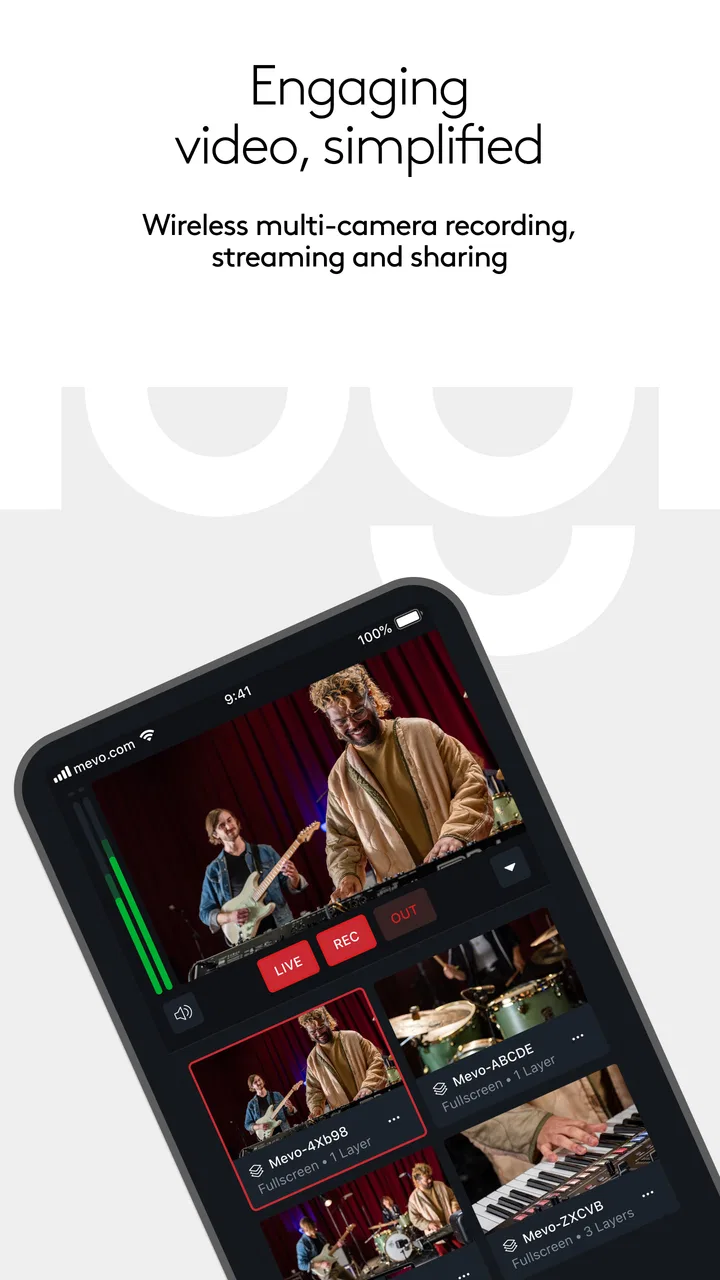
My first impression of Mevo Studio was that it tries to solve a very specific live-video problem: managing several Mevo cameras without turning a phone or tablet into a miniature broadcast control room full of cables and distractions. It is a free app in the Video Players & Editors category, developed by Logitech Europe S.A., and its purpose becomes clear as soon as you think beyond a single-camera livestream. The appeal is not simply recording video; it is shaping a live production from multiple wireless viewpoints.
That focus makes it more interesting than a general camera app, but also less universally useful. If you only need to film a quick clip, edit a short video, or start a casual stream from one phone, this is probably more equipment than you need. If you regularly present, teach, perform, cover events, or create live content where changing angles matters, the workflow can feel much more natural than repeatedly stopping to reposition one camera.
What the first week feels like
The first week is where the app makes its strongest case. There is a satisfying difference between thinking about camera placement before a session and physically walking over to change every angle during it. With a compatible Mevo setup, the phone or tablet becomes the place where I can direct attention between viewpoints while the cameras stay positioned around the room. That is especially useful when the subject cannot pause, such as a rehearsal, interview, lesson, demonstration, or small live event.
You May Also Like

 Blood Strike: 2.5 Anniversary
Blood Strike’s Loadouts Turn Every Drop Into a Tactical Gamble
A close look at Blood Strike’s custom loadouts: how fast access to signature weapons reshapes its battle royale rhythm, rewards preparation, and narrows the gap between fights.

 Pandora - Music & Podcasts
Pandora’s Music Is Easy to Start, but Harder to Recover
Pandora’s strength is its low-effort path from a seed to a station. Its weak spot is how much confidence it asks you to place in connection, setup, and quiet recovery.

 8 Ball Pool
 Is Built on Rivalries, Rematches, and Routine
A close look at the rivalries, rematches, shared routines, and unanswered safety questions that turn a quick pool match into a persistent mobile community.

 Samsung Music
’s Quiet Strength Is Playing What You Already Own
Its reach comes less from spectacle than from dependable access to a personal library. That simplicity is both the app’s strongest retention engine and its ceiling.

 AccuWeather: Weather Radar
AccuWeather Review: A Quick, Clear Forecast for Everyday Decisions
For everyday plans, the best forecast is the one you can understand quickly. AccuWeather makes rain timing, radar, and local conditions easy to act on, with a few trade-offs.

 Hill Climb Racing
Why Hill Climb Racing Still Turns Crashes Into One More Run
A tiny car, a bumpy hill and one more upgrade: Hill Climb Racing keeps resurfacing because its simple chaos makes every near-miss feel personal.
More From Our News Desk
View All News


I would not describe the experience as completely effortless. A multi-camera workflow has more moving parts than a normal phone recording. The cameras need to be positioned sensibly, the wireless connection needs to behave, and the controlling device needs to remain available for the production. Still, the central idea is easy to understand: instead of treating each camera as an isolated recorder, I can approach the session as one coordinated live production.
The strongest early use case is a presenter who wants a reliable wide view and a closer view without asking another person to operate a camera. A wide angle can establish the room, while a tighter angle keeps the speaker or demonstration visible. That arrangement is more useful than simply owning several cameras, because the value comes from being able to switch perspectives while the session is happening.
There is also a practical advantage for people who work alone. When I am filming a product demonstration or teaching something, I would rather spend my attention on the explanation than constantly monitor whether the framing is still useful. A prepared multi-camera arrangement gives the production some resilience. If one viewpoint feels too distant or visually flat, another can take over without interrupting the flow.
New users should spend the first few sessions learning the physical side of the workflow rather than immediately chasing a polished broadcast. Camera height, background clutter, light direction, and the distance between the subject and each viewpoint matter just as much as the app controls. Mevo Studio can coordinate the cameras, but it cannot rescue a badly chosen angle or a room where the main subject is backlit.
That is one of the less obvious lessons: the app rewards preparation before it rewards improvisation. I get better results when I decide which view is the safe default, which view is the detail shot, and which view is only for occasional use. Without that plan, switching angles can become a novelty that adds movement without adding meaning.
The app is also easier to appreciate when I treat the controlling device as a production tool rather than a second camera. If I need that phone for messages, notes, or another recording at the same time, the arrangement becomes less convenient. A dedicated device, when available, makes the workflow calmer because the controls are not competing with everyday phone use.
For a first-week test, I would record a short private session and deliberately use only two viewpoints. I would check whether the wireless arrangement stays comfortable, whether the subject remains visible in both angles, and whether switching actually improves the story. Adding more cameras before answering those questions can make the setup look impressive while making operation harder.
Where it fits better than a normal camera app
A regular camera app is usually better for a single, self-contained recording. It is simpler, familiar, and less dependent on a coordinated setup. Mevo Studio earns its place when the viewer benefits from changing perspectives or when the person operating the production cannot physically move between cameras.
Compared with a conventional live-streaming app, its identity is more focused on multi-camera control. A general streaming tool may be the better choice when I want the broadest possible platform options, quick posting, or a minimal setup. Mevo Studio makes more sense when the cameras and the production workflow are the priority.
That distinction matters because the app should not be judged as a replacement for every video tool. It is not the obvious answer for editing finished footage, making social clips, or capturing a spontaneous moment. Its value appears before and during a live production, not after the fact when I want a timeline full of editing controls.
Why it may still matter after the novelty fades
The month-to-month question is more demanding than the first-week question. Multi-camera switching is fun when it is new, but a useful app needs to earn its place through repeated situations. In my view, Mevo Studio has lasting value for people whose work naturally benefits from multiple viewpoints. A teacher can use a room view and a demonstration view; a performer can preserve both the overall scene and a closer perspective; an interviewer can keep the conversation readable without relying on one fixed frame.
The recurring benefit is not the number of cameras. It is the reduction in interruptions. Once a setup is familiar, I can begin a session with the cameras already placed and concentrate on the content. That can make the app feel less like a gadget and more like part of a repeatable routine.
A useful monthly habit would be to keep a small setup plan for recurring productions. I would note which camera is the dependable main angle, which one handles close details, and which positions create problems with light or movement. This sounds basic, but it prevents every session from becoming a fresh experiment. The app becomes more valuable when the surrounding process becomes predictable.
For community groups and small organizations, the appeal can be practical rather than flashy. A volunteer or presenter may be able to run a more varied live production without a full crew. That does not remove the need for rehearsal, but it can make a modest event feel more watchable. The trade-off is that the operator still has to understand both the content and the controls, so it is not a magic substitute for production experience.
The app’s current version is 4.2.1, and it has established enough presence to be a known option rather than an experimental curiosity. Its average rating is 4.2 from around 451 ratings, with close to 98 written reviews, and it has passed 100K+ installs. Those figures suggest a real user base, but they do not change the central decision: lasting value depends on whether I repeatedly create content that benefits from wireless multi-camera direction.
Because the app is free to install, the initial barrier is lower than paying for a specialist production package before knowing whether the workflow suits me. However, the broader setup can still involve equipment and learning time, and in-app purchases range from $19.00 to $149.00 per item. I would therefore judge the app and the complete production setup together, not treat the free download as the full cost of adopting the system.
That pricing detail also changes who should experiment. A curious beginner can explore the app without committing immediately, while a professional or organization should think about recurring needs before paying for extras. If I only stream a few times a year, a simpler single-camera arrangement may deliver better value because it asks less of me between events.
A realistic recurring scenario
Imagine a small instructor running a weekly practical class. One Mevo camera shows the instructor and the room, while another is positioned toward the work surface. During an explanation, the wider view gives context. When the instructor demonstrates a small technique, the closer view becomes more useful. The operator can stay near the lesson instead of walking across the room to adjust a camera.
That workflow is more convincing than a staged demonstration because it solves a repeated problem: the subject changes scale during the same session. The setup also creates a reason to return to the app every week. Once the positions, lighting, and switching rhythm are understood, the production can become part of the class routine rather than a special event.
There is a trade-off, though. The instructor must either operate the controls or assign that task to someone else. If the action is fast and unpredictable, constant switching may distract from teaching. In that case, a carefully framed single camera could be better. Mevo Studio is most effective when the changes in viewpoint are deliberate and tied to the structure of the session.
The maintenance that determines whether you keep using it
The largest long-term burden is not learning one control. It is maintaining the whole chain: cameras charged and placed, wireless connections ready, the control device available, and the room arranged so each viewpoint remains useful. That is manageable for a regular production, but it can feel excessive for a one-off recording.
I would build a short pre-session check into the routine. Confirm that every camera is where I expect it, inspect the background in each view, check the main angle first, and run a brief test before the audience arrives. The test is especially important because a multi-camera setup can appear fine from one viewpoint while another has an unwanted obstruction or poor composition.
Another practical tip is to label positions mentally or physically rather than relying on memory. “Wide,” “desk,” and “speaker” are more useful than vague camera identities when I am under pressure. This reduces hesitation during a live session and makes it easier for another operator to take over.
Maintenance also includes reviewing the workflow after each production. I would not only ask whether the stream worked. I would ask whether every angle earned its place, whether switching happened at useful moments, and whether the operator had enough attention left for the event itself. If one camera is rarely selected, removing it may improve reliability and reduce mental load.
This is an important long-term trade-off: more viewpoints do not automatically mean a better production. Every additional source can add flexibility, but it can also add another connection to monitor and another decision to make. The best setup is often the smallest one that covers the visual needs of the session.
The app is rated for Everyone, which makes it approachable from an age-rating perspective, but that should not be confused with being effortless for every user. The production concepts are still specialized. Someone who has never planned camera coverage may need a few practice sessions before the controls feel natural, even though the app itself is not aimed at a restricted audience.
For recurring work, I would also keep a fallback plan. A simple single-camera recording or a basic live-streaming app can serve as a backup if the multi-camera arrangement becomes impractical. That does not weaken the case for Mevo Studio; it recognizes that reliability sometimes matters more than visual variety, especially when missing a live moment would be costly.
Where fatigue begins
The first source of fatigue is operational attention. Live switching asks me to watch the content, anticipate what is about to happen, and choose the right viewpoint. If I am also presenting, teaching, or interviewing, those responsibilities compete. The app can make a solo production possible, but it does not make a solo operator limitless.
The second is repetition. If every session uses the same two angles and the subject rarely changes position, the visual benefit can shrink. At that point, the multi-camera setup may become a ritual that takes time without noticeably improving the result. I would periodically compare the finished sessions with a simpler recording to make sure the extra work is still justified.
Wireless dependence is another consideration. A wireless workflow is attractive because it reduces physical clutter and makes camera placement flexible, but it also means the experience depends on the surrounding setup behaving well. I would be cautious about using it for an important event without a rehearsal in the same room and under similar conditions.
There is also a creative fatigue that is easy to overlook. Switching angles can make a production feel active, but unnecessary changes can distract viewers. I prefer using the wide view when orientation matters, the closer view when detail matters, and switching only when the change helps the audience understand something. The app gives me control; good judgment still has to decide when not to use it.
People looking for a complete editing environment may also feel limited by the app’s central purpose. If my main goal is cutting clips, adding captions, adjusting a finished timeline, or building a polished edited video, a dedicated editor is likely a better fit. Mevo Studio belongs earlier in the process, where the important decision is which live view the audience should see now.
Likewise, someone who wants the fastest possible route from phone to livestream should consider a standard streaming app first. The simpler option may be better for spontaneous broadcasts, travel, personal updates, or situations where carrying and positioning multiple cameras is unrealistic. I would choose Mevo Studio only when the additional viewpoints solve a real problem rather than merely adding technical interest.
My long-term verdict
After the novelty fades, Mevo Studio still makes sense for a clearly defined group: creators, educators, presenters, performers, and small production teams who repeatedly need more than one live viewpoint. Its strongest quality is workflow improvement. It can let one operator manage a more varied visual presentation while the cameras remain placed around the space.
I would recommend trying it if I already use compatible Mevo cameras or have a recurring production where changing angles genuinely improves communication. The free app makes testing less intimidating, and the Everyone rating keeps it broadly approachable. I would still budget for the wider setup carefully, remembering that in-app purchases run from $19.00 to $149.00 per item and that equipment, rehearsal, and operator attention are part of the real commitment.
I would skip it if my needs stop at quick phone videos, ordinary editing, or occasional one-camera livestreams. In those situations, the usual camera, streaming, or editing alternatives are likely to be faster and less tiring. I would also hesitate if I cannot rehearse the wireless arrangement or if no one can dedicate attention to directing the production.
My lasting recommendation is to begin with the smallest useful setup, create a repeatable pre-session checklist, and judge every camera by the value it adds to the viewer. If the app becomes part of a weekly or monthly workflow, its convenience can outweigh the preparation. If it remains an occasional experiment, the maintenance will probably feel heavier than the benefit.
So, does it earn permanent space? Yes, but only when multi-camera live production is a recurring need rather than a novelty. In that situation, Mevo Studio offers a focused way to coordinate wireless viewpoints and make live video more deliberate. For everyone else, a simpler tool may be the wiser long-term companion.
FAQs for Mevo Studio
01What is Mevo Studio, and what can I use it for?
Mevo Studio is a live-production application designed to help creators manage and stream video from compatible Mevo cameras. It can be used for live events, interviews, classes, podcasts, presentations, and social media broadcasts. The app is intended to provide a more flexible production setup than a basic camera stream, with tools for switching views, arranging sources, and controlling the broadcast from a mobile device or supported computer.
02Which devices and cameras are compatible with Mevo Studio?
Compatibility is one of the most important points to check before downloading Mevo Studio. The experience depends on the Mevo camera model, operating system, and the version of the app available for your device. Some features may require newer hardware or a supported desktop environment, while older phones and tablets may have limitations. It is best to verify the current compatibility list and system requirements in the official store listing before installation.
03Can I stream to platforms such as YouTube, Facebook, or Twitch?
Mevo Studio is built for live production and can support streaming workflows connected with popular online platforms, although the exact destinations and available options may change with app updates or account requirements. You may need to sign in, authorize the service, configure stream details, and have a stable internet connection. Before going live, test the setup privately to confirm that the selected platform, audio, video quality, and privacy settings work correctly.
04Does Mevo Studio require a paid subscription or additional equipment?
The application may be available to download without an upfront charge, but some advanced production, streaming, cloud, or collaboration features can depend on a subscription, a compatible Mevo camera, or other supported accessories. Your total cost may also include microphones, tripods, lighting, storage, or a stronger network connection. Review the current pricing and in-app purchase information carefully, because included features can vary by plan, device, and region.
05Is Mevo Studio suitable for beginners, and what should I prepare before using it?
Mevo Studio is approachable for users who have basic experience with mobile apps and live streaming, but its production controls may take time to learn. Before starting, charge your devices, update the app and camera firmware, connect to reliable Wi-Fi or wired internet when possible, and test microphones and camera angles. A short rehearsal is strongly recommended, since audio levels, network stability, permissions, and platform login settings can affect the final broadcast.
Pros
- Live-stream directly to multiple platforms from one app.
- Supports branded overlays
- logos
- lower thirds
- and custom layouts.
- Remote camera control makes solo productions easier to manage.
- Cloud-based production tools simplify collaboration with remote guests.
- Works well for interviews
- events
- podcasts
- and social broadcasts.
Cons
- Advanced production features may require a paid Mevo subscription.
- Stable streaming depends heavily on strong Wi-Fi or mobile data.
- Multi-camera setups can consume significant battery and bandwidth.
- The interface may feel overwhelming for first-time broadcasters.
- Some features work best with additional Mevo camera hardware.

Mevo Studio
Gallery